.png)
Create Professional Business Cards Without a Designer

Updated: May 27
Learn how to design impactful business cards on your own—no design skills required. Discover tools, layouts, and tips to make a great first impression.

Business cards aren’t dead—they’ve just evolved. In a world where your online presence is key, a well-designed business card is still one of the most effective ways to build credibility, spark conversations, and stay memorable. The good news? You don’t need a designer—or even a design background—to make it happen.
In this guide, you’ll learn exactly how to create business cards that impress and convert, using smart tools, strong layouts, and pro-approved techniques.
Whether you’re in tech, freelancing, entrepreneurship, or consulting, your card can become a silent ambassador for your brand—if it’s done right.
Why Business Cards Still Matter in 2026
We live in a hyper-digital world, but the tactile experience of handing over a business card still has power. A great card:
Shows professionalism and attention to detail
Makes networking more personal and human
Helps people remember who you are (and what you do)
Gives instant access to your contact info—no search required
Can link directly to digital spaces (via QR or NFC)
It’s not just paper—it’s a physical version of your personal brand.
What Makes a Business Card “Killer”?
Feature | Why It Matters |
Clean layout | Ensures readability and visual balance |
Consistent branding | Builds trust and brand recognition |
Strong hierarchy | Guides the eye to the most important details first |
Contact clarity | Makes it easy to connect in one glance |
Tactile or visual hook | Helps the card stand out in a stack |
Step-by-Step: Design Your Own Business Card
You don’t need Illustrator. You don’t need a degree. Just a clear brand idea and a tool that helps you put it all together. Here’s how to go from concept to print-ready in under an hour.
Step 1: Know What Needs to Be on the Card
Start with the essentials:
Full name
Job title or role
Company or brand name
Phone number
Email address
Website or portfolio
Optional: LinkedIn, calendar link, address
And then: choose one focal point (a strong headline, a logo, or a call to action).
Tip: Less is more. Don’t overload the space—make every detail count.
Step 2: Choose a Layout That Matches Your Brand
Business cards typically come in two orientations:
Horizontal (landscape): classic, readable, versatile
Vertical (portrait): bold, modern, less common
From there, pick a layout type:
Layout Style | Best For |
Logo-focused | Solo founders, startups, creatives |
Text-led | Professionals in consulting, legal, tech |
Split layout | Designers, marketers, dual-sided cards |
Minimalist | Tech teams, developers, digital-first brands |
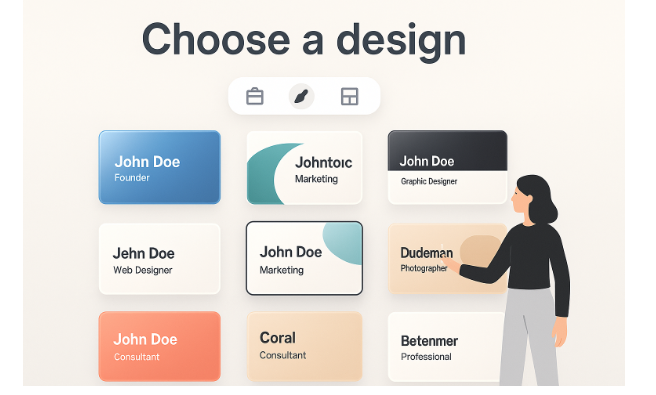
Step 3: Use an Online Business Card Generator
An AI business card generator allows you to:
Upload your logo
Enter your info
Choose color palettes
Preview layouts in real time
Export in print-ready formats
They also take care of spacing, alignment, and font pairing—so your card always looks pro.
Bonus: Some tools even integrate QR codes or allow you to create a matching digital version.
Step 4: Apply Design Best Practices
Fonts
Use 1–2 fonts max
Choose a typeface that reflects your brand (modern, classic, clean)
Keep body text between 9–11pt for legibility
Colors
Stick to your brand palette
Use high contrast (dark on light or light on dark)
Avoid using too many shades—it can look amateur
Logos
Use a high-resolution SVG or PNG
Make sure it doesn’t overpower the text
Place it smartly—corner, top, or back of the card
Spacing
Allow “breathing room” around all elements
Don’t cram too much info on a single side
Use alignment (left, right, center) to create structure
Step 5: Consider a QR Code (If It Makes Sense)
QR codes aren’t a gimmick—they’re practical if they lead somewhere meaningful. Consider adding a small, clean QR that links to:
Your portfolio
A scheduling calendar
Product demo or download
Personal vCard for easy contact saving
Just make sure it scans well and doesn’t clash with the rest of your design.
Mini-Case: From Zero to Professional in 30 Minutes

Scenario: Ravi, a freelance backend developer, needed cards for a last-minute tech conference.
Process:
Used an AI logo creator to generate a clean monogram-style symbol
Entered contact info and personal tagline (“Clean APIs. No overhead.”)
Added a QR code linking to his GitHub
Printed cards with matte black finish and white text
Result: His cards were not only memorable, but sparked conversation—people loved the simplicity and the bold contrast.
Print & Format Checklist
Before you hit "print":
Element | Requirement |
Size | Standard: 3.5" x 2" (or 85mm x 55mm) |
Bleed | Add 3mm–5mm extra space around edges |
Resolution | 300 DPI minimum |
Format | PDF, SVG, or high-res PNG |
Color Mode | CMYK for printing, RGB for digital preview |
What to Put on the Back?
Use the back of your card to:
Add your logo in full
Display a call to action
Include a short brand tagline
Feature a QR code
Keep it clean and white for notes
Pro tip: Double-sided cards feel more premium and let you separate design from content.
Quick Wins: Business Card Design Do’s and Don’ts
Do | Don’t |
Keep fonts and colors consistent | Use more than two fonts or random colors |
Use white space strategically | Cram everything into one side |
Match your digital brand look | Use design elements that clash with your site |
Print a test version before mass order | Send to print without checking physical copy |
Use a professional export format | Upload screenshots or low-res JPGs |
Final Thoughts: You Don’t Need a Designer—Just Direction
Business cards still open doors. But in 2025, they also start conversations, drive clicks, and reinforce brand trust. And now, thanks to AI-powered tools and intuitive templates, you can create a card that feels custom, confident, and clean—without hiring anyone.
Whether it’s your first card or your rebranding moment, go bold, stay consistent, and never underestimate the power of a great 3.5" x 2" impression.
Article prepared by a Turbologo expert.


I like how this breaks down business card design without making it feel complicated, especially for people who aren’t designers. When I have some free time, I usually switch to something simple like Speed Stars for a quick bit of fun and relaxation.